New · Brilo is now a connector for ChatGPT, Claude, Gemini, Muse, Grok and more. Your assistant can pick up the phone.
Get started
Get started



Phone calls for your AI assistant
Your AI assistant can now make phone calls.
Your AI assistant can now make phone calls.
Your AI assistant can now make phone calls.
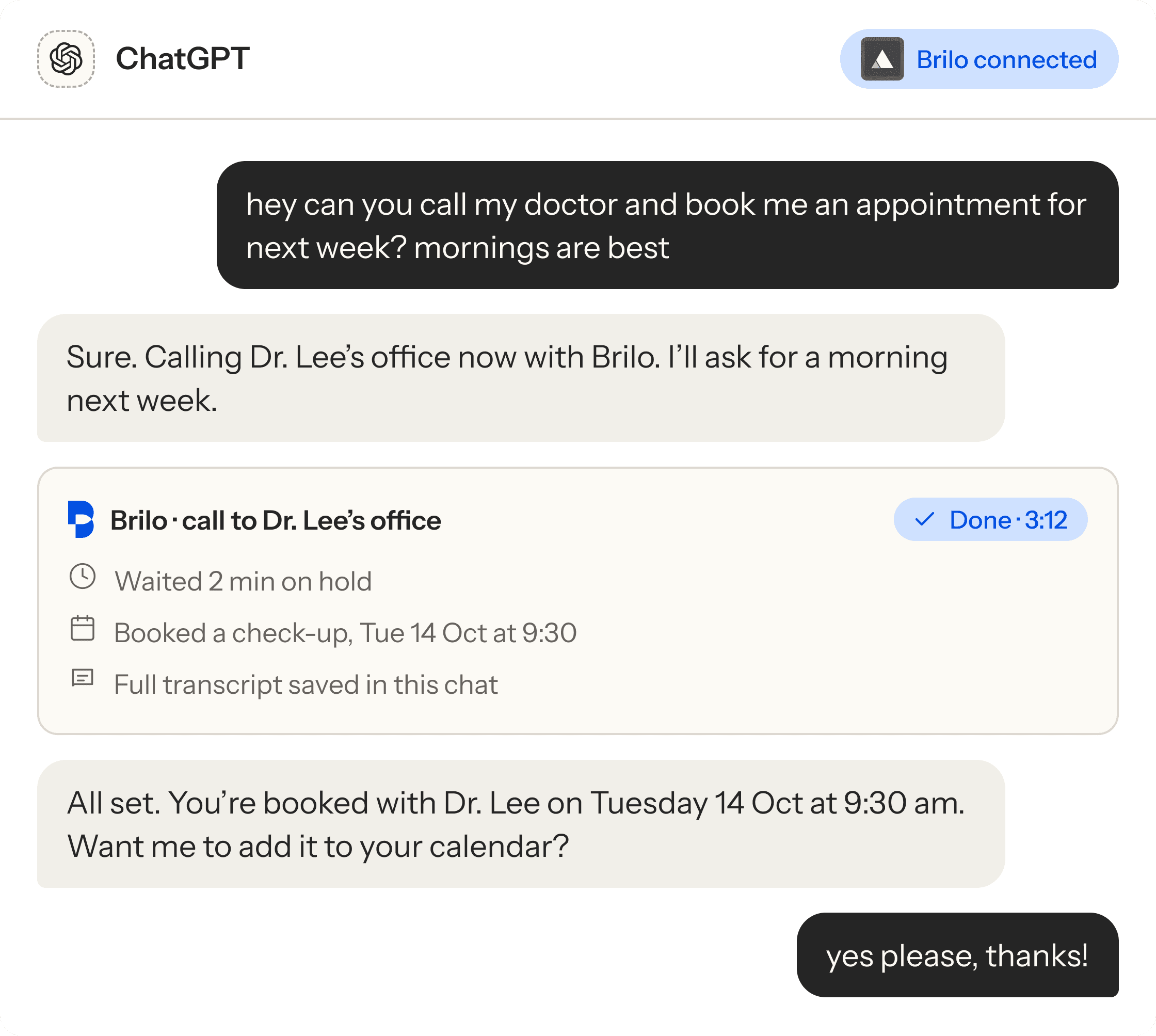
Add the Brilo connector to ChatGPT, Claude, Gemini, Muse, Grok or any other AI assistant. Ask it to call the doctor, the landlord or the cable company, and Brilo makes the call and reports back in the chat.
Add the Brilo connector to ChatGPT, Claude, Gemini, Muse, Grok or any other AI assistant. Ask it to call the doctor, the landlord or the cable company, and Brilo makes the call and reports back in the chat.

Keeps the calls you want, stops the ones you don’t
Makes the calls you keep putting off
A text summary after every call


Using Claude, Gemini, Copilot or another assistant? Copy the setup prompt

Opens your assistant with the Brilo setup message already typed. Press Enter and it connects Brilo and your Assist plan at the founding $4.99/mo. Nothing to fill in here.
Same chat in
ChatGPT
Muse
Grok
Phone calls for your AI assistant
Your AI assistant can now make phone calls.
Add the Brilo connector to ChatGPT, Claude, Gemini, Muse, Grok or any other AI assistant. Ask it to call the doctor, the landlord or the cable company, and Brilo makes the call and reports back in the chat.
Keeps the calls you want, stops the ones you don’t
Makes the calls you keep putting off
A text summary after every call
Using Claude, Gemini, Copilot or another assistant? Copy the setup prompt
Opens your assistant with the Brilo setup message already typed. Press Enter and it connects Brilo and your Assist plan at the founding $4.99/mo. Nothing to fill in here.
Same chat in
ChatGPT
Muse
Grok
Available as a connector in
Your assistant not listed? Copy the setup prompt and paste it in. Availability varies by assistant.
Your assistant not listed? Copy the setup prompt and paste it in. Availability varies by assistant.
Your assistant not listed? Copy the setup prompt and paste it in. Availability varies by assistant.

ChatGPT
by OpenAI

Claude
by Anthropic

Gemini
by Google

Muse
by Meta

Grok
by xAI

Copilot
by Microsoft

Perplexity
by Perplexity

No app to download
Web, desktop, iPhone and Android

Calls and transcripts stay private
Cancel any time
Every other assistant
One prompt. Paste it into any assistant.
One prompt. Paste it into any assistant.
One prompt. Paste it into any assistant.
One prompt. Paste it into any assistant.
Not on ChatGPT, Muse or Grok? Copy the setup prompt and paste it into a new chat. Your assistant reads the Brilo instructions and sets itself up. No links, keys or settings to find.
Not on ChatGPT, Muse or Grok? Copy the setup prompt and paste it into a new chat. Your assistant reads the Brilo instructions and sets itself up. No links, keys or settings to find.
Not on ChatGPT, Muse or Grok? Copy the setup prompt and paste it into a new chat. Your assistant reads the Brilo instructions and sets itself up. No links, keys or settings to find.

Paste the prompt
Paste the prompt
Open a new chat in your assistant and paste it in. It reads the Brilo setup instructions.
Open a new chat in your assistant and paste it in. It reads the Brilo setup instructions.

Approve the connection
Approve the connection
Your assistant gives you a link and a short code. Open it, enter the code and confirm your $4.99 Assist plan.
Your assistant gives you a link and a short code. Open it, enter the code and confirm your $4.99 Assist plan.

Ask it to call
Ask it to call
Brilo connects to your assistant on its own. Ask for your first call in plain words.
Brilo connects to your assistant on its own. Ask for your first call in plain words.
Brilo setup prompt
Works in any assistant
Works in any assistant
Set yourself up with a Brilo phone number so you can make calls for me and answer when people call back. Read https://docs.brilo.ai/personal-assistants/connect and follow it step by step. Pass my name, email and phone number if you know them. Show me the link and the code, and let me pay in my own browser. Don't pay or approve anything for me, and keep your keys private. Save a note in your memory that you can make and check phone calls for me with Brilo, as the page describes. When you're connected, tell me the new number and call me to prove it works.
Set yourself up with a Brilo phone number so you can make calls for me and answer when people call back. Read https://docs.brilo.ai/personal-assistants/connect and follow it step by step. Pass my name, email and phone number if you know them. Show me the link and the code, and let me pay in my own browser. Don't pay or approve anything for me, and keep your keys private. Save a note in your memory that you can make and check phone calls for me with Brilo, as the page describes. When you're connected, tell me the new number and call me to prove it works.
Then paste it into a new chat
Claude
Gemini
Copilot
Perplexity
Claude Code
Cursor
Any AI agent
Building your own agent? Read the agent instructions
Building your own agent? Read the agent instructions
How it works
Tap. Press Enter. That’s it.
Tap. Press Enter. That’s it.
Tap. Press Enter. That’s it.
Tap. Press Enter. That’s it.
No app to download and no form on this site. Your assistant sets Brilo up for you, then it’s ready to call.
No app to download and no form on this site. Your assistant sets Brilo up for you, then it’s ready to call.
No app to download and no form on this site. Your assistant sets Brilo up for you, then it’s ready to call.
01
Tap your assistant
Tap your assistant
Tap your assistant
ChatGPT, Muse or Grok opens with the Brilo setup message already written. Anywhere else, paste the setup prompt.
ChatGPT, Muse or Grok opens with the Brilo setup message already written. Anywhere else, paste the setup prompt.
02
Press Enter
Press Enter
Press Enter
Your assistant connects Brilo and starts your Assist plan. You confirm, and setup is done.
Your assistant connects Brilo and starts your Assist plan. You confirm, and setup is done.
03
Ask it to call
Ask it to call
Ask it to call
In plain words, whenever you need. Brilo calls, handles the conversation and reports back.
In plain words, whenever you need. Brilo calls, handles the conversation and reports back.
What it can do
Anything you’d ask a person to call about
Anything you’d ask a person to call about
Anything you’d ask a person to call about
Anything you’d ask a person to call about
Your assistant already knows what you need. Brilo gives it a voice on the phone.
Your assistant already knows what you need. Brilo gives it a voice on the phone.
Your assistant already knows what you need. Brilo gives it a voice on the phone.

Books appointments
Books appointments
Books appointments
Doctor, dentist, salon, vet. Brilo asks for the times you gave and confirms the slot.
Doctor, dentist, salon, vet. Brilo asks for the times you gave and confirms the slot.

Waits on hold for you
Waits on hold for you
Waits on hold for you
Brilo sits in the queue so you don’t have to, then gets it sorted.
Brilo sits in the queue so you don’t have to, then gets it sorted.

Cancels, disputes, rebooks
Cancels, disputes, rebooks
Cancels, disputes, rebooks
Subscriptions, bills, bookings. Brilo works the phone tree and asks for what you want.
Subscriptions, bills, bookings. Brilo works the phone tree and asks for what you want.

Checks before you go
Checks before you go
Checks before you go
Opening hours, stock, a table for four tonight. One quick call, answer in the chat.
Opening hours, stock, a table for four tonight. One quick call, answer in the chat.

Works through your call list
Works through your call list
Works through your call list
Five calls on the to-do list? Ask once and Brilo takes them one by one.
Five calls on the to-do list? Ask once and Brilo takes them one by one.

Reports back in the chat
Reports back in the chat
Reports back in the chat
What was said, what was agreed and what happens next, with the full transcript.
What was said, what was agreed and what happens next, with the full transcript.
Hear it
What the other end of the line hears
What the other end of the line hears
What the other end of the line hears
What the other end of the line hears
A polite, clear caller that knows exactly what you asked for, and doesn’t hang up until it’s done.
A polite, clear caller that knows exactly what you asked for, and doesn’t hang up until it’s done.
A polite, clear caller that knows exactly what you asked for, and doesn’t hang up until it’s done.

Who it’s for
Built for the calls in your life
Built for the calls in your life
Built for the calls in your life
Built for the calls in your life
Eight ways people are planning to use it. If you use an AI assistant, there’s a call it can take off your plate.
Eight ways people are planning to use it. If you use an AI assistant, there’s a call it can take off your plate.
Eight ways people are planning to use it. If you use an AI assistant, there’s a call it can take off your plate.
For your parents
Make the calls for Mum
Make the calls for Mum
Make the calls for Mum
Ask your assistant to ring her pharmacy or book her doctor. You get the summary; she doesn’t lift a finger.
Ask your assistant to ring her pharmacy or book her doctor. You get the summary; she doesn’t lift a finger.
Adult children
For your work
Your admin calls, handled
Your admin calls, handled
Your admin calls, handled
Chase an invoice, confirm a site visit or book the supplier while you get on with the job.
Chase an invoice, confirm a site visit or book the supplier while you get on with the job.
Freelancers, agents, contractors
For when the phone is hard
Type it, Brilo says it
Type it, Brilo says it
Type it, Brilo says it
Deaf, hard of hearing or phone-anxious? Type what you need in the chat and read the transcript after.
Deaf, hard of hearing or phone-anxious? Type what you need in the chat and read the transcript after.
Accessible by design
For when you’re away
Nine hours ahead, still sorted
Nine hours ahead, still sorted
Nine hours ahead, still sorted
Ask at breakfast. Brilo calls during their business hours and the answer is waiting in your chat.
Ask at breakfast. Brilo calls during their business hours and the answer is waiting in your chat.
Travellers and remote workers
For the calls you dread
Cancel, dispute, rebook
Cancel, dispute, rebook
Cancel, dispute, rebook
Brilo sits through the phone tree, asks for the refund and reports back.
Brilo sits through the phone tree, asks for the refund and reports back.
Anyone who hates calling
For busy households
Never chase the school again
Never chase the school again
Never chase the school again
The clinic, the sitter and the school office, all from one chat.
The clinic, the sitter and the school office, all from one chat.
Working parents
For your to-do list
Clear the call backlog
Clear the call backlog
Clear the call backlog
The calls you keep moving to tomorrow. Ask once and Brilo works through them.
The calls you keep moving to tomorrow. Ask once and Brilo works through them.
Busy professionals
For quick checks
Call before you drive over
Call before you drive over
Call before you drive over
Is the pharmacy open? Is the part in stock? Brilo checks and tells you in seconds.
Is the pharmacy open? Is the part in stock? Brilo checks and tells you in seconds.
Anyone short on time
A closer look
Your assistant, before and after Brilo
Your assistant, before and after Brilo
Your assistant, before and after Brilo
Your assistant, before and after Brilo
Today your assistant can tell you who to call. With Brilo, it makes the call.
Today your assistant can tell you who to call. With Brilo, it makes the call.
Today your assistant can tell you who to call. With Brilo, it makes the call.
What you ask for
What you ask for
With Brilo connected
Finds the clinic’s number
Calls the clinic for you
Waits on hold
Books, cancels and reschedules by phone
Sends the transcript back to the chat

Yes
No
No
No
No
Yes
Yes
Yes
Yes
Yes
What you ask for
What you ask for
With Brilo connected
Finds the clinic’s number
Calls the clinic for you
Waits on hold
Books, cancels and reschedules by phone
Sends the transcript back to the chat
Yes
No
No
No
No
Yes
Yes
Yes
Yes
Yes
The Assist plan
A phone plan for your AI assistant
A phone plan for your AI assistant
A phone plan for your AI assistant
A phone plan for your AI assistant
$4.99 a month for the first 500 founding members. You start it inside your assistant when you press Enter on the setup message. After 500, the price goes to $29.99 a month.
$4.99 a month for the first 500 founding members. You start it inside your assistant when you press Enter on the setup message. After 500, the price goes to $29.99 a month.
$4.99 a month for the first 500 founding members. You start it inside your assistant when you press Enter on the setup message. After 500, the price goes to $29.99 a month.
Assist plan · founding member
235 of 500 left
$4.99
$4.99
for the first month
then $29.99 a month, cancel any time
then $29.99 a month, cancel any time
Unlimited Calling
Unlimited Calling
Calls made for you, within fair use
Calls made for you, within fair use
Transcript and summary in the chat
Transcript and summary in the chat
Works in ChatGPT, Claude, Gemini, Muse, Grok and more
Works in ChatGPT, Claude, Gemini, Muse, Grok and more
Cancel any time from your assistant
Cancel any time from your assistant
Fair use: US and Canada.
Questions
Before you start
Before you start
Before you start
Before you start
Can I sign up on this website?
Can I sign up on this website?
Which assistants does it work with?
Which assistants does it work with?
What happens when I press Enter?
What happens when I press Enter?
What is the Assist plan?
What is the Assist plan?
What number does the business see?
What number does the business see?
Is the $4.99 price really locked?
Is the $4.99 price really locked?
Are there per-call charges?
Are there per-call charges?
Can I use it for my mum or dad?
Can I use it for my mum or dad?
Where does it work?
Where does it work?
Are my calls private?
Are my calls private?

The Assist plan
A phone plan for your AI assistant
A phone plan for your AI assistant
A phone plan for your AI assistant
Tap your assistant, press Enter, and ask it to make your next call.
Tap your assistant, press Enter, and ask it to make your next call.
The Assist plan
A phone plan for your AI assistant
Tap your assistant, press Enter, and ask it to make your next call.
Brilo AI
Phone calls for your AI assistant.
Brilo AI
Phone calls for your AI assistant.
Brilo AI
Phone calls for your AI assistant.
Brilo AI
Phone calls for your AI assistant.